Posts

Is IGTV the future of video platform? My Thoughts.

Instagram is being aggressive -once again- since the last time they took down Snapchat with their Story feature. And now they released a new video platform called Instagram TV or IGTV and go head to head with YouTube since other video platforms like Vimeo and Periscope didn't make it. So now let's talk about it. I don't know what, but I think YouTube is already such a big video platform. Some people maybe bored of YouTube for some reasons. No one can beat YouTube's power in the video platform world. Especially a new startup or whatsoever. So we need a big one, right? And a jerky mind came to Instagram's team and they decided to compete YouTube head to head on video platform as they are already big and everybody use it. They even launch an individual app for IGTV that you can download it now on your smartphone. But there are things that they decided not to "copy". They even do some kind of out of the box thing. Maybe they are also trying to copy Apple'...

Best iOS 11 Keyboards

Image
So it's been a long time for me not to write about tech anymore. Since I decided to make an instagram account and slowly move my post to that platform. But apparently instagram disabled my account just after I made my new tech account. It says that I violated something with my one second account. Anyway, back to the topic. The best iOS keyboard out there is here. For me, there are 2 of them. Here they are: 1. Swiftkey Yes, Swiftkey is very popular in the Android world, far far away before it reached the galaxy of iOS. But now on iOS 11 it is even getting better. The design There is no much different on iOS third party's keyboard design as Apple limits developer's capability on modifying the design. Maybe for the sake of user so they (umh, we I guess) won't be confused on design changes. The only design that Apple let them (or maybe us) to change is the background. You can choose between the background that they have provided for you or you can freely use any i...

Why iPhone 6s is stil the BEST iPhone in 2017!

Image
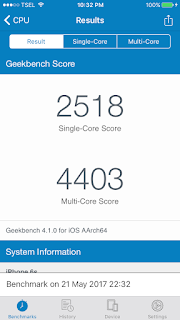
The iPhones in 2017 For all of you who is an Apple fanboy (kinda just like me, for now) you must have heard about the almighty 10th anniversary iPhone that is just around the corner along with the underrated iPhone 7s and 7s Plus. Folks started to name it which such names like iPhone X or iPhone 8 -Which is funny I think to release iPhone 7s and iPhone 8 at the same time-. Some of the fanboys are preparing their bucks to be slapped on Cook's face to get the iPhone 8. But some of them -and maybe me- are not going to spend money to get the newest iPhone yet. Even the 7s and 7s Plus. And what is the reason behind that decision? Because I'm now currently having the iPhone 6s which is not  surprisingly still faster and better in many categories compare to the "green robot" even the flagships even though this year is gonna be its 2nd birthday. Here is why.... 1. Performance and Specification The 6s has an "s" which is sacred in the iPhones line. Just look...

How to Get Google Assistant on your iPhone!

Geeky peeps! Do you ever get bored of Siri and you just get jealous about your neighbour using and old school android (Like the Oneplus) that has a good assistant and sometimes it is better in some situations? And here's the jealousy we get there as an iOS user. But now Google is doing very kind to provide us the exact same Google Assistant that they have on Androids. Yes, there is a Google Assistant that is natively built for iOS and you can simply open your AppStore and search for it. But unfortunately, it's only for American Apple ID users only. So basically it's not only for Google Assistant but you can also do this for every location specific app. So first , you need to SIGN OUT from your Apple ID account. You can do that by simply going to the bottom of your app store and click Apple ID and click sign out. Second . Google search your location specific wanted app and open the app store via that search. And then it will automatically open your app store and si...

How to Record an iPhone/iPad screen free with no jailbreak

Hi! Do you ever want to share a tutorial of how to make things on your iPhone/iPad like photo editing, video editing, or even photography? Well, there is a drawback that iOS users have to deal with, it's the limitation. For some reasons Apple isn't allowing users to do things like the "robot" can do. One of them is recording your screen, the thing that you can do easily on any Android devices. But hey, there is always someone who is really curious about things and end up with a solution. Yes, it is possible to record a screen on your iPhone. 1. First of all you need to visit the magical site called emu4ios.net . From there you'll provided by a list of apps that you can download (mostly mod apps) 2. You need to find the AirShou app. This app is the app you want to record your screen on your iPhone/iPad. 3. Simply download it and let it finish. 4. You can't open it yet. Give the app a permission. Go to settings - General - scroll down to device ma...

iOS 10.3.3 IS NOW OUT!!! Here's things to know about it

Image
Yo Peeps! Finally Apple has released the last build for the iOS 10 before releasing the new iOS 11 later this year. And yes, this update is not the update we want since the 11's beta is out there running in the wild.  This build has taken a long time to be released for public. Seems like Apple is really serious taking this build because this build is going to be the last iOS 10 for some Apple products like the iPhone 5 and the iPhone 5c. You can easily find this update on your phone (and yes, this is Apple's speciality on delivering the latest software updates worldwide) by going to the settings -> general -> software update and if you're on the last latest build which is the iOS 10.3.2, you will find this update size for around 85MB for iPhone 6/s user. It will be bigger on the 7. If you want to do it directly (and if you are not on a jailbreak waiting list) you can directly hit the download and instal button and enjoy your morning coffee. So, What's new?...

How to Use Google Pixel's Live Wallpaper on Android 6.0+

Image
Hi there! Nowadays Android are really famous with its ability to customise. And Google's Pixel is the best "pure" Vanilla Android to be the standard of stock modern Android devices. So what is so good about the Pixel? On of the best features on Pixel is the Wallpaper that is provided by Google itself lively! Such as the Earth live wallpaper that directly comes from Google's satellite. Amazing right? But this feature is only available exclusively on the Google Pixel. But Luckily, the developers on XDA has ported the wallpaper app so we, a happy Android users are able to download it and use it just like the Pixel does. Link? Yeah I know it. Here you go. Click here . And spoil yourself with a little bit of screenshots below. Enjoy! :)